Pro Bono Go makes it easy to find and sign up for pro bono opportunities.
Use the search field and filter menu to find opportunities that match your interests.
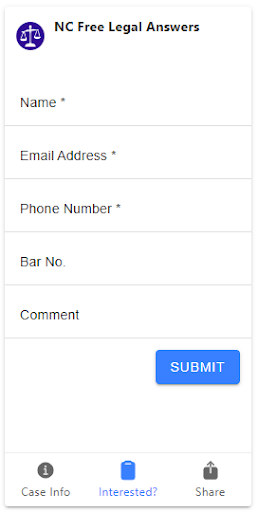
See one you like? Click Interested?, fill out the short sign-up form and click Submit.
That’s it! Someone from the sponsoring organization will get in touch.
Set up customized email alerts to get new opportunities delivered right to your inbox.
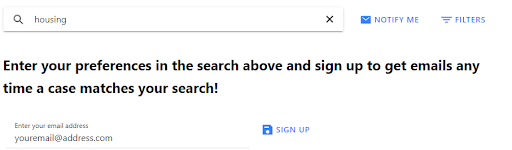
If you would like to receive specific types of cases, click on “Filters” and then choose your “Legal Problem Type” and then “Notify Me” and enter your email address and click on “Sign Up”
If you would like to be alerted when any case, project, or clinic is added, just click on “Notify Me” and enter your email address and click on “Sign Up”
Anatomy of pro bono opportunity cards
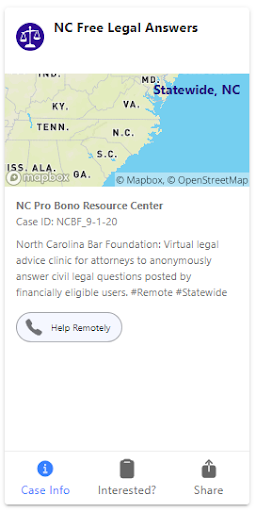
Each pro bono opportunity is represented by a card.
The name of the opportunity is at the top of the card.
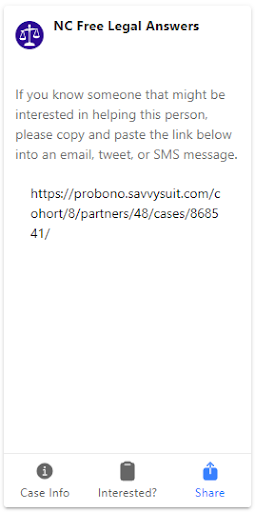
Each card has three screens, which are accessible by the three buttons at the bottom of the card.
The three screens are:
Case Info:This is the default screen. Contains a map showing the opportunity’s geographic location, the partner organization, and a short description of the opportunity.
Interested?:Contains a short sign-up form for the opportunity.
Share:Provides the link to the opportunity so you can share it with colleagues.
Find opportunities by searching
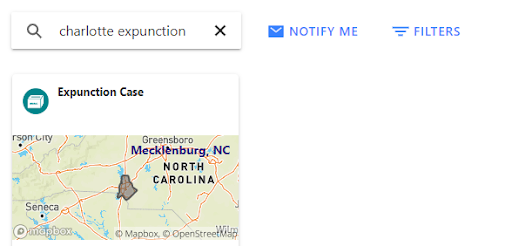
Search by location and/or keyword.
Results will show up as you type.
Find opportunities by filtering
Click the Filtersbutton
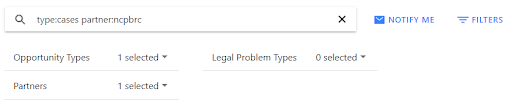
Use the Opportunity Types, Legal Problem Types, and Partners menus to set your filter criteria.
Note that your filter criteria will appear in the search field.
Results will show up as you set your criteria.
Set up customized email alerts
Using search terms
Click Notify Me
Enter search terms in the search field. You can search opportunities by keyword and/or location.
Enter your email address
Click Sign Up. That’s it! You’re done!
Repeat these steps to set up additional email alerts.
Using filter criteria
Click Notify Me, then click Filters
Use the Opportunity Types, Legal Problem Types, and Partners menus to set your filter criteria. (Note that your filter criteria will appear in the search field.)
Enter your email address and click Sign Up. That’s it! You’re done!
Repeat these steps to set up additional email alerts.